
Dropzone software that talks to every jumper’s phone
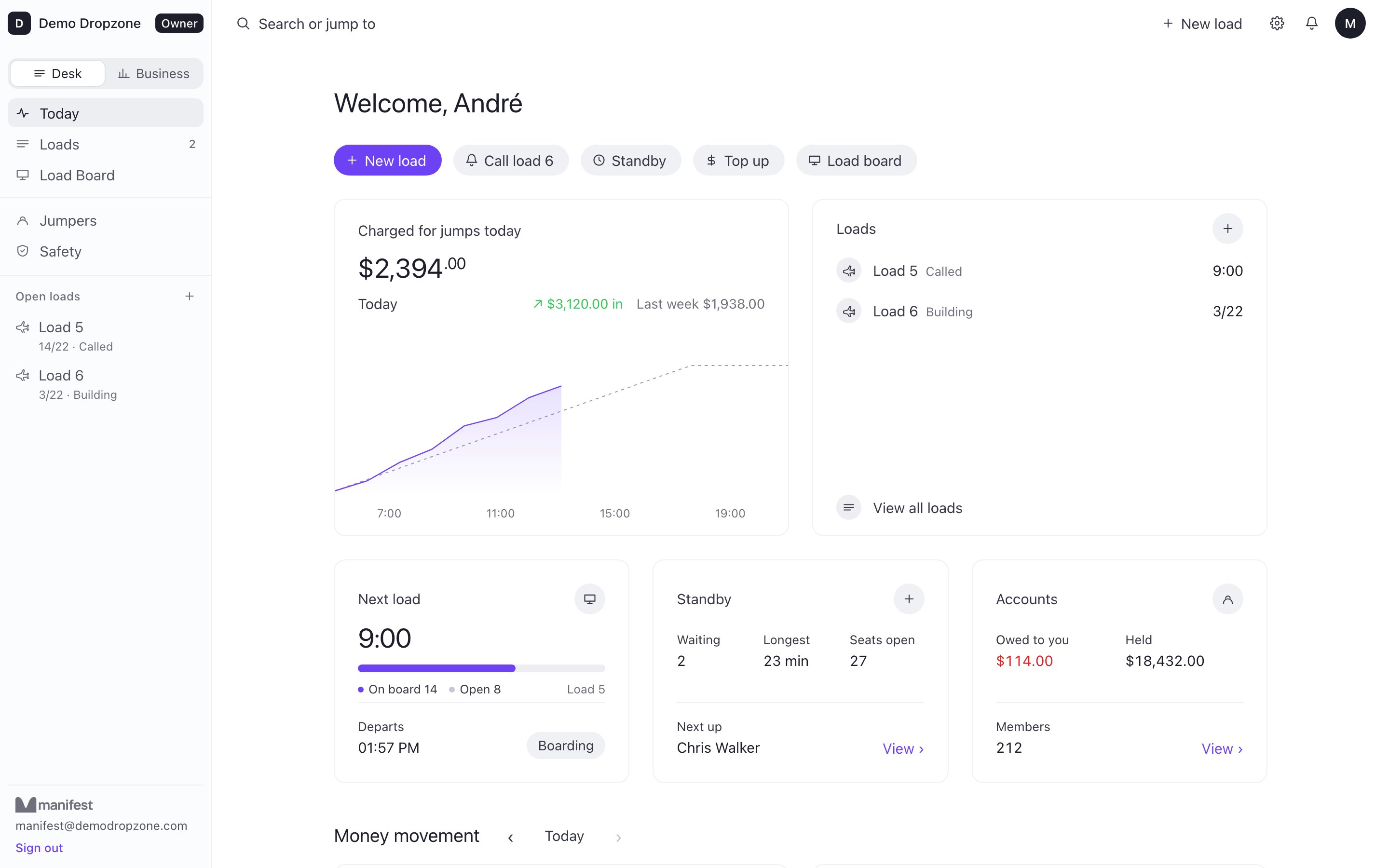
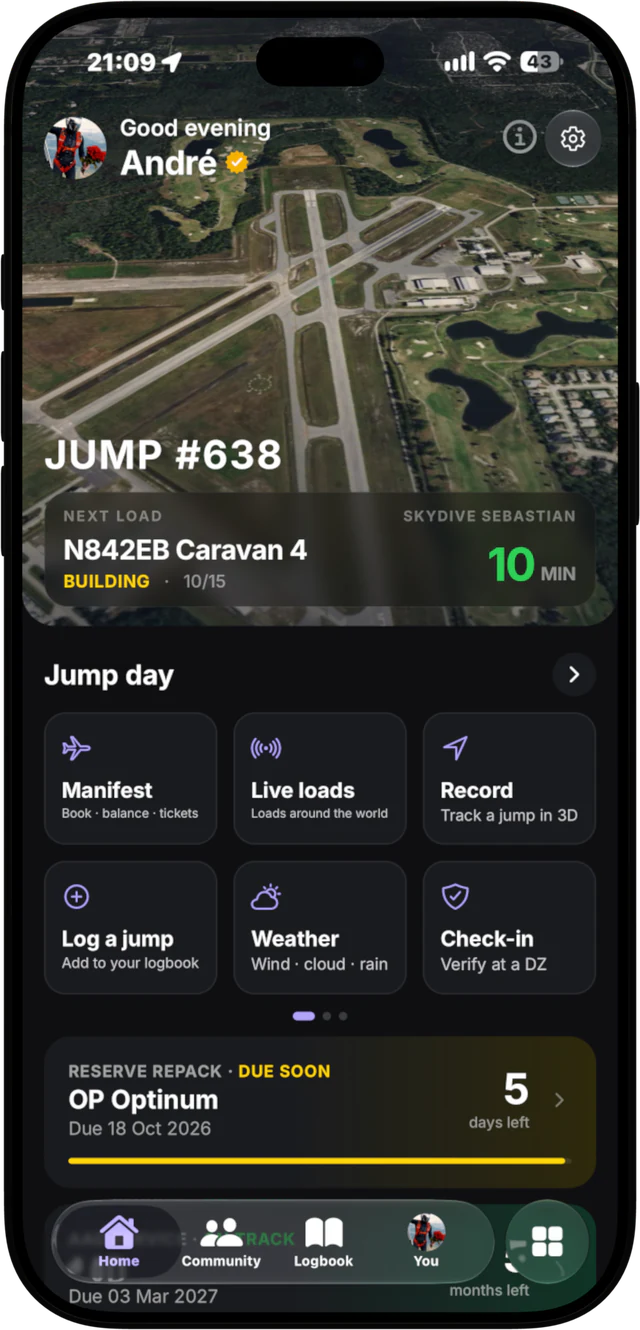
Manifest Desk is skydiving software for dropzones: your manifest system, your money and your safety checks in one browser tab. What makes it different is the other end. Every load on your desk is live in the app your jumpers already carry.
What dropzone software has to do
On a busy Saturday, manifest is the bottleneck. Someone has to fill the plane in the right exit order, keep standby fair, know who owes money, chase people to the hangar and make sure nobody boards with an out-of-date reserve. Most dropzone management software handles the desk side. The jumper side is still shouting, a whiteboard and a queue at the counter.
Manifest Desk covers both, on one live system: the loads, the money, the paperwork and the safety checks at the desk, and the load calls, bookings and top-ups on every jumper's phone.
Features: everything on the desk
Loads board and exit order
Build loads, move jumpers between them and see every slot at a glance, in exit order. Reserve seats on a load for an organizer, keep teams together and set the crew each load needs. Double-manifest rules catch a jumper booked on two loads too close together.
Standby by type
See who is waiting by jumper type, how long the longest wait has been and how many seats are open. Teams wait as one group, and jumpers can join standby from their phone, so the list builds itself while you fill the plane.
Load calls and holds
Press one button and the call goes to every jumper on that load, on their phone and Lock Screen, at 15, 10 and 5 minutes and boarding. Put one load on hold, or every load at once, and the jumpers on them see it straight away.
Weight and balance
Each load shows its weight against the aircraft before it departs, so you see a heavy load while there is still time to fix it.
Jumper accounts, tickets and vouchers
Every jumper has an account with a live balance. Sell jump tickets, vouchers and gift vouchers, and see at a glance who owes you money and how much is held on account.
Payments, receipts and the cash drawer
Jumpers top up with Apple Pay in the app, straight into your own Stripe account. At the desk, take guest payments, send receipts, count the cash drawer and close the day.
Waivers and check-in rules
Set check-in rules per licence type, with waivers signed before the jump. The desk shows what is missing before anyone gets on a load.
Safety checks
Before a jumper boards, the desk checks currency, reserve repack date and AAD service. A season check and a daily check-in sit alongside it.
Staff, roles and staff pay
Give your team their own desk logins as Owner, Manifest or Crew, and work out staff pay per jump type from what actually flew. Each person joins through their own invite, you choose who sees money totals and reports, and owners can turn on two-step sign-in.
Aircraft, fuel and maintenance
Track fuel, hours and maintenance for each aircraft, so an inspection never sneaks up on you. The pilot gets their own view of the load.
Reports
A day log of every load, liabilities such as credit held and tickets and vouchers outstanding, and an accounting export for your bookkeeper.
Rental gear
Keep track of your rental gear on the desk, next to the jumpers who rent it.
Landout SOS and Who's back
After each load, Who's back shows who has returned. A jumper who lands out can send an SOS that puts them on a live map at the desk, with chat until they are picked up.
Hangar TV board
Open the board on any TV with a browser. Loads, slots and calls show live in the hangar, so fewer people walk up to ask.
Import from your current system
Bring your jumpers and balances across with a CSV import, so nobody starts from zero.
Some back-office features depend on the plan. The plan comparison shows exactly what each one includes.
What makes it different: it is connected to the jumper app
Old manifest software stops at the counter. Manifest Desk is one half of a system. The other half is the free Manifest app, which jumpers from 225+ home dropzones in 46 countries already use.
- Self-manifest. Jumpers book themselves and their friends onto a load, or join standby, from the app. You set the limits and the desk always has the final say. How self-manifest works.
- Load calls on the Lock Screen. Staff press one button. Called, 15, 10 and 5 minutes, boarding and holds reach every jumper on that load, on their phone and Lock Screen. At Manifest Desk dropzones the Lock Screen load is free for jumpers. More on load calls.
- Apple Pay top-ups into your own Stripe. Jumpers top up with Apple Pay or card in the app (Cash App Pay in the US). The money goes straight to your Stripe account, you are the merchant, and the balance shows on the desk immediately. Dropzone payments explained.
- Landouts on a live map. Nothing is tracked during the jump. After landing, a jumper taps "Landed out?" and picks injured, need a ride or walking back. Their position updates on a live satellite map at the desk until it is resolved. Send a driver a pickup pin, call the jumper, notify staff, or hold every load with one tap. It supports your own emergency procedures; it is not a guaranteed rescue tracker. Landout safety.
How it works on a jump day
- Open the desk in a browser and the hangar board on a TV.
- Jumpers check in and book onto loads from the app, or you add them at the desk.
- You build the load, and the safety check flags anything out of date before anyone boards.
- Press call. Every jumper on the load gets it on their Lock Screen, at 15, 10 and 5 minutes and boarding.
- After the load, the desk sees who is back. A landout shows on the live map.
Switching from your current system
- We set you up. We set up your dropzone directly and import your jumpers and balances for you.
- Run it alongside. Keep your current system running next to Manifest Desk until you trust it.
- No lock-in. Cancel anytime, on any plan.
What we need from you: your jumper list as a CSV, your aircraft and jump prices, and your staff list.
Want to see it first? The desk has a sample-day demo, and we will walk you through it on a call.
Pricing
- Weekend dropzone: 1 aircraft, 3 desk logins.
- Full-time: up to 3 aircraft, 10 logins.
- Big operations: unlimited.
Every plan is a monthly subscription with no lock-in, and no fee per jump or per booking. Founding prices for the first dropzones, set with you. See the plans and ask for yours.
Book a 20-minute demo Explore Manifest Desk
What dropzone software should do: questions owners ask
What happens if the internet drops at our dropzone?
The desk keeps working for the things that cannot wait. It keeps showing the last loads it had, and check-ins, load calls, boarding and departures you make are saved in the browser and sent the moment the internet is back. Payments and new bookings wait for the connection, and a load call whose time has passed is not sent late.
What is dropzone software?
Dropzone software, also called skydiving manifest software or a skydive manifest system, is what a dropzone uses to build loads, put jumpers on them, charge their accounts and keep the jump day safe and moving. Manifest Desk does all of that in a browser, and connects every load to the phones of the jumpers on it.
What should skydiving software for a dropzone do?
At minimum: a loads board with exit order, standby, jumper accounts and balances, load calls and holds, weight and balance against the aircraft, and safety checks for currency, reserve and AAD before anyone boards. A complete system also handles waivers and check-in rules, staff pay, aircraft hours and maintenance, guest payments, the cash drawer and end of day, and reports for your accountant. Manifest Desk does all of these, and puts every load call on each jumper's Lock Screen.
How much does Manifest Desk cost?
Every plan is a monthly subscription with no lock-in, never a fee per jump or per booking. There are three plans: Weekend dropzone (1 aircraft, 3 desk logins), Full-time (up to 3 aircraft, 10 logins) and Big operations (unlimited). Founding prices are set with each dropzone, so ask us for yours. Cash and card taken at the desk carry no fee from us. Cancel anytime.
How do we switch from our current system?
We set up your dropzone with you: aircraft, jump prices, staff and jumpers. You can run Manifest Desk next to your current system for as long as you like, until you trust it, and we are with you on your first jump day. There is no lock-in.
Can we import our jumpers and balances?
Yes. Export your jumper list and balances from your current system as a CSV and the desk imports it, so every jumper starts with the right account. We do this for you during setup.
How do payments work?
Jumpers top up their account in the Manifest app with Apple Pay or card, and the money goes straight to your own Stripe account through Stripe Connect, so you are the merchant. At the desk you can take guest payments, sell tickets, vouchers and gift vouchers, and count the cash drawer at end of day. Every payment gets a receipt.
Does it work for a small club or weekend dropzone?
Yes. The Weekend dropzone plan is built for one aircraft and busy weekends, with 3 desk logins and crew free. All you need is a laptop or tablet with a browser for the desk, and any TV with a browser for the hangar board. There is nothing to install.
What safety features does it have?
Before anyone boards, the desk checks currency, reserve repack and AAD service, and your waiver and check-in rules per licence type. Each load shows its weight against the aircraft, the crew it needs and double-manifest conflicts. After the load, Who's back shows who has returned, and a jumper who lands out can send an SOS that puts them on a live map at the desk, with chat and one tap to hold every load. It supports your own emergency procedures; it is not a guaranteed rescue tracker.
What about jumpers on Android?
The Manifest app is on iPhone today, and Android is being built.
New to Manifest? Start at the home page or read how Manifest works.