
How Manifest works at your dropzone
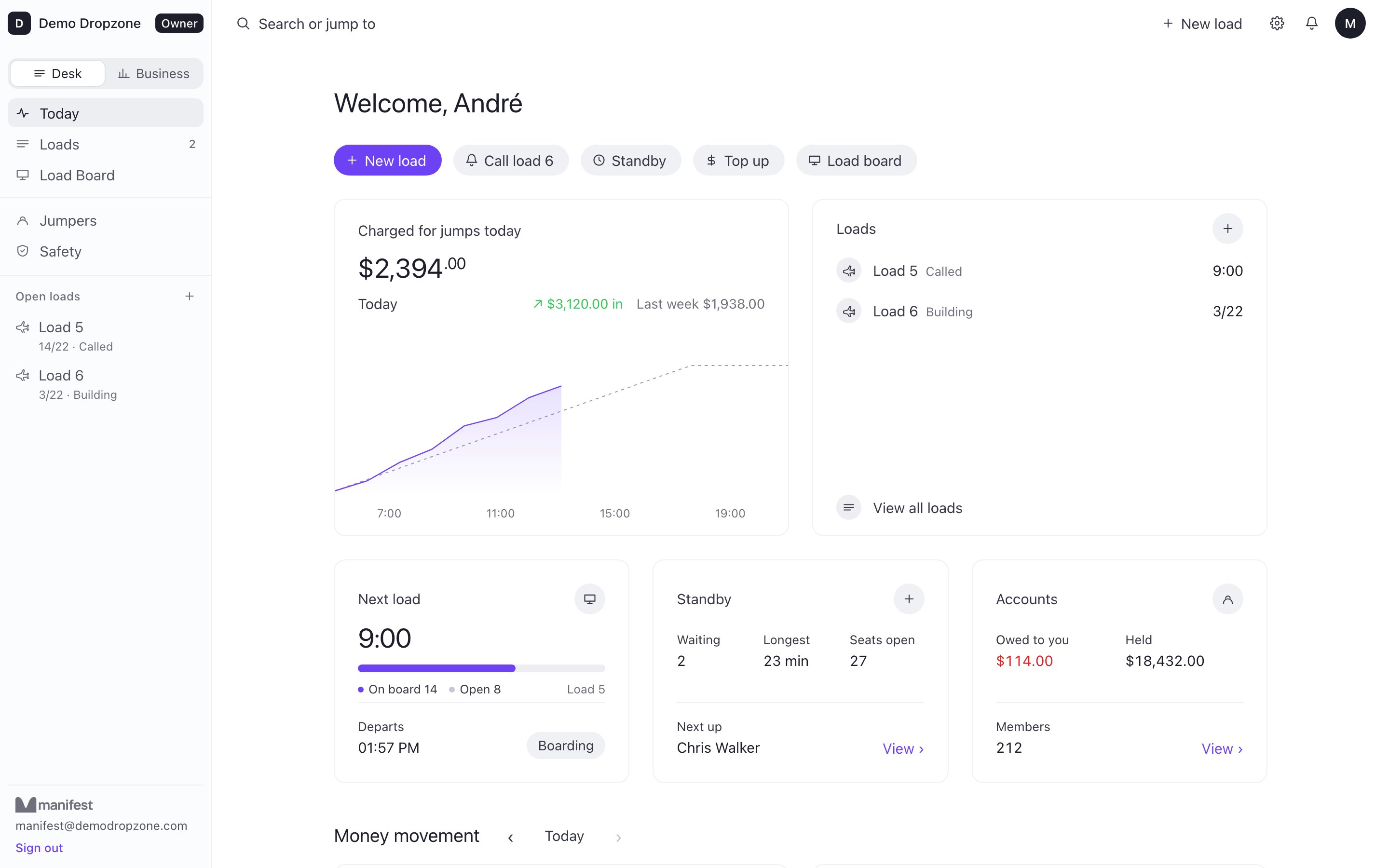
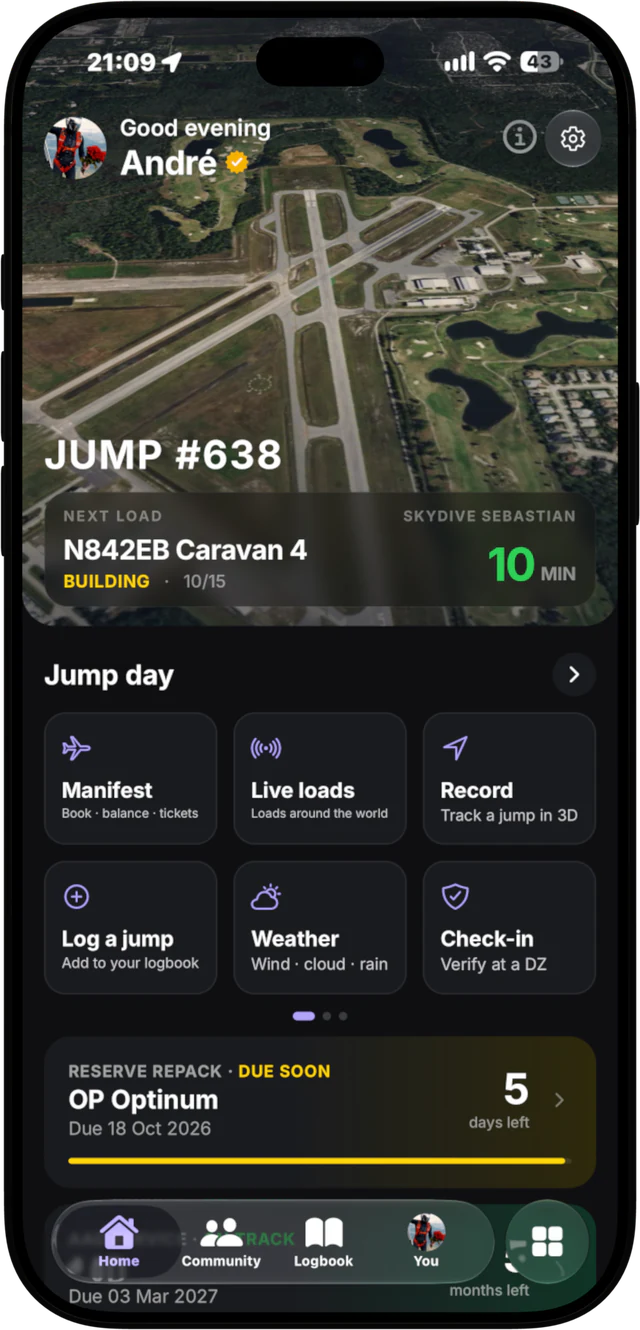
Manifest is one skydiving app connected to your dropzone: two things that talk to each other. The app is for jumpers, on iPhone. Manifest Desk is for the dropzone, in the browser on the manifest counter. When a dropzone runs Desk, both sides see the same loads, the same balances and the same calls, live.

Two sides, one jump day
- The app (jumpers): live loads, self-manifest, top-ups, load calls on your Lock Screen, recording, the 3D replay, your logbook, weather, gear reminders and your Check-in Pass. Free to download.
- Manifest Desk (dropzone): the loads board, standby, jumper accounts and balances, staff, aircraft, holds and alerts, safety checks, reports and a hangar TV board. Runs at desk.jumpmanifest.com.
Below is one ordinary jump day at a Desk dropzone, step by step. Each step says which side it happens on.
A jump day, step by step
- App
Open the app and see the loads
You open Manifest on the drive in. The loads are already live: which aircraft, how many seats are taken, who is on each load and the minutes to call. Live loads run at 150+ dropzones, pulled from each dropzone's own manifest board.
- App
Put yourself on a load
Tap a load and book yourself on, or bring your friends with you. If it is full, join standby. The dropzone sets the limits, and the desk always has the final say.
- App
Top up with Apple Pay
Low on jump tickets? Top up in the app with Apple Pay or a card (Cash App Pay in the US). The money goes straight to the dropzone's own Stripe account. The dropzone is the merchant, not us.
- Desk
Manifest sees it instantly
Your name lands on the load on Desk the moment you book, and your new balance shows on your account right away. Staff approve you, move you to another load, or put you back on standby. No paper slips, no shouting across the hangar.
- DeskApp
Staff press call, every phone updates
When the load is ready, staff press one button. Called, 10 minutes, 5 minutes, boarding and holds reach every jumper on that load, on their phone and on their Lock Screen. A hold on the desk shows up as a hold in your pocket.
- App
Recording starts before takeoff
With Manifest Pro, the recorder arms itself 2 minutes before your load takes off. Without Pro, tap Record before you board. Either way the phone stays in a zipped pocket and you jump as normal.
- App
Land and watch the jump in 3D
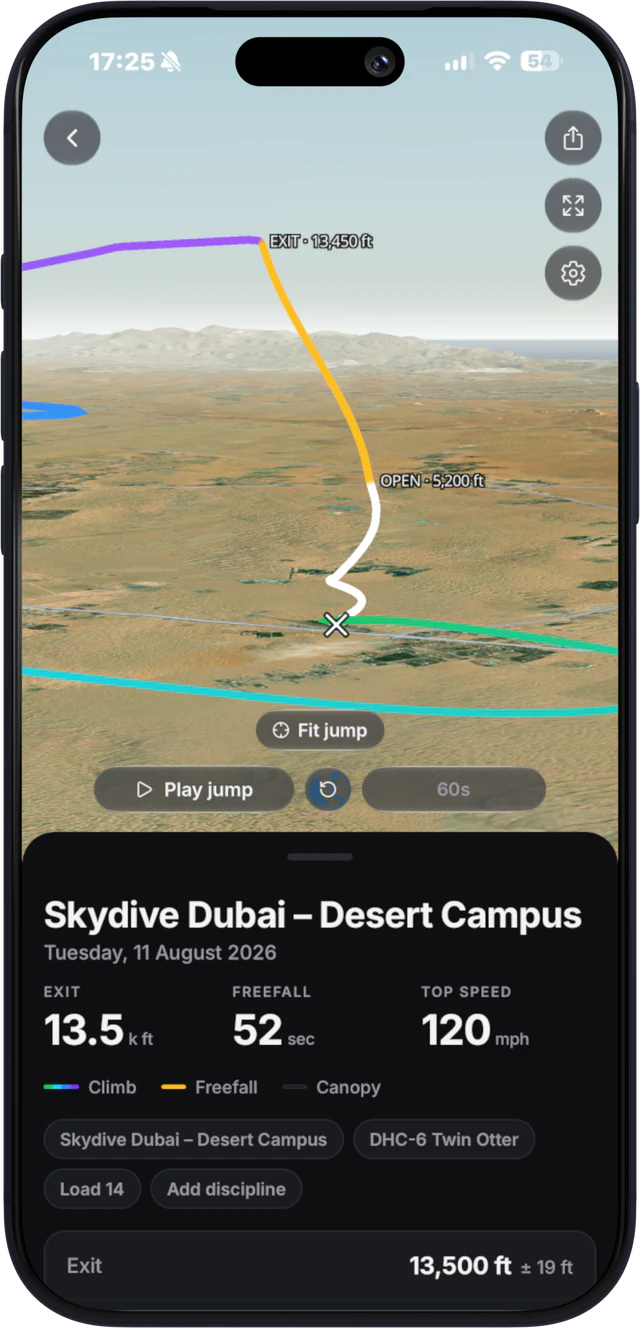
After landing, the whole flight replays in 3D over real terrain, from the climb to the landing. Recording and the 3D replay are free. Pro adds replay stats: exit, glide, canopy distance and top canopy speed.
- Desk
The desk sees who is back
After each load, Desk lists everyone on it. Staff tick names as jumpers walk in, and anyone with a phone can tap "I'm back" in the app. Anyone missing after 30 minutes turns red.
- AppDesk
If someone lands out
The dropzone tracks nothing during the jump. After landing, the jumper taps "Landed out?" in the app or from the Lock Screen and picks injured, need a ride, or walking back. Their position shows on a live satellite map at the desk, with the distance from the dropzone, until it is resolved.
From there the desk can send a driver a pickup pin (QR code, Google Maps or WhatsApp), show the jumper who is driving and the ETA, call the jumper, push an alert to chosen staff, and put every load on hold with one tap. The emergency contact only shows if the jumper is injured.
Lock Screen loads are free at Desk dropzones
Your load on the Lock Screen and in the Dynamic Island, with notifications at gear-up (15 minutes), the 10 minute call and final call (5 minutes), is part of Manifest Pro. At a dropzone that runs Manifest Desk, Lock Screen loads are free for every jumper. The dropzone is paying for the system, so its jumpers get the calls.
What the dropzone gets
- Self-manifest that fills loads without staff typing names, with the desk in control.
- In-app top-ups paid straight into the dropzone's Stripe, with no fee per booking.
- One button for load calls instead of a PA system nobody can hear from the packing mat.
- A landout flow on a live map, built to support the dropzone's own emergency procedures.
- Safety checks for currency, reserve, AAD and papers, plus season check and daily check-in.
See the full feature list and plans on the Manifest Desk page, or read how load calls and landout safety work in detail.
What jumpers get
Everything above, plus the parts that work at any dropzone: live loads, recording and the 3D replay, a logbook with in-person sign-offs, winds aloft, gear and reserve repack reminders, and a Check-in Pass for Apple Wallet. Jumpers on Manifest come from 225+ home dropzones in 46 countries.
Questions
What happens if the internet drops at our dropzone?
The desk keeps working for the things that cannot wait. It keeps showing the last loads it had, and check-ins, load calls, boarding and departures you make are saved in the browser and sent the moment the internet is back. Payments and new bookings wait for the connection, and a load call whose time has passed is not sent late.
What is the difference between the Manifest app and Manifest Desk?
The app is for jumpers, on iPhone: live loads, self-manifest, top-ups, load calls, recording, the 3D replay and your logbook. Manifest Desk is for dropzone owners and manifest staff, in the browser: the loads board, standby, accounts, staff, aircraft, safety and reports. At a Desk dropzone the two are connected and update each other live.
Does my dropzone need Manifest Desk for me to use the app?
No. Live loads, recording, the 3D replay, the logbook, weather and gear reminders work at any dropzone. Self-manifest, in-app top-ups, one-button load calls, the landout map and free Lock Screen loads need your dropzone to run Manifest Desk.
Are Lock Screen loads free?
At a dropzone that runs Manifest Desk, yes, for every jumper. Everywhere else, your load on the Lock Screen and in the Dynamic Island with gear-up, 10 minute and final call notifications is part of Manifest Pro.
Where does my money go when I top up?
Straight to the dropzone's own Stripe account. The dropzone is the merchant. Your new balance shows on the desk immediately, so you can manifest right away.
Does Manifest track me during the jump?
The dropzone does not see you during the jump. Your own recording stays on your phone for your replay. The desk only sees a position if you tap Landed out after landing, and it stops once the landout is resolved. It supports the dropzone's emergency procedures and depends on battery, GPS and signal, so it is not a guaranteed rescue tracker.
Is there an Android app?
Manifest is on iPhone today. Android is in the making. Tell me the day it is out. Manifest Desk runs in any browser.